Group link types
Link types define the relationship between the subject being evaluated and the raters doing the evaluation. The following group link types are available for linking subjects to raters:
Manual selection
Manual selection allows the project manager (or the group assigned rater selection privileges) the ability to select raters for each subject from a predefined list, such as a staff datasource or client list. This link type is ideal for small scale projects with a handful of users per subject.
No relational or hierarchical logic is applied; therefore no automation is provided for the manual selection link type.
Manual entry
Manual entry allows the group assigned the rater selection privilege to input the names and email addresses of the raters manually on a form. This link type is generally used to allow subjects the freedom of entering their personal list of raters without restricting them to a predefined list of users.
No relational or hierarchical logic is applied, therefore no automation is provided for the manual entry link type. Not supported in DIG definitions.
Relationship datasource (Many-to-many)
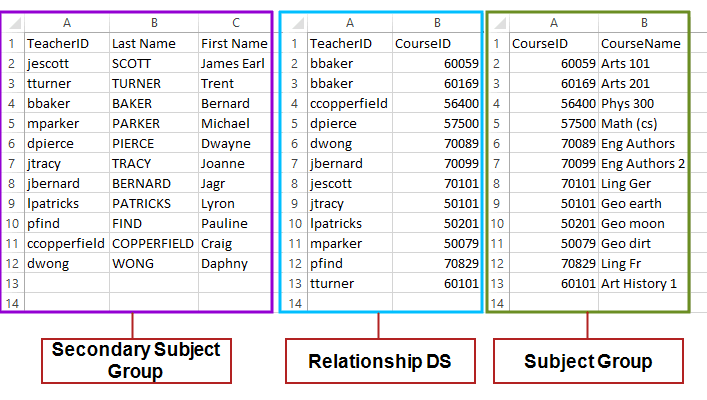
The relationship datasource link type provides the most complete layer to connect multiple subjects to multiple peripheral users. This link type is typically used for large scale many-to-many relationships, such as those found in school-wide evaluations where students are linked to their respective courses and/or teachers.
Once a group has been configured using the Relationship datasource link type, the project automatically populates users based on the relationship datasource link.
‘Links to’ (Many-to-one)
Use the ‘Links To’ link type to quickly map a single peripheral user, such as a supervisor or manager, to a subject. In this case, a preset column in the subject’s datasource will contain the peripheral user IDs. These IDs may be mapped to an external datasource or within the same datasource as the subject. The many-to-one relationship afforded by the links to link type means that a single peripheral user may be assigned to several subjects but the opposite is not true. Some real-world examples of this relationship include one manager having several subordinates, one teacher having several students, or even a doctor having multiple patients.
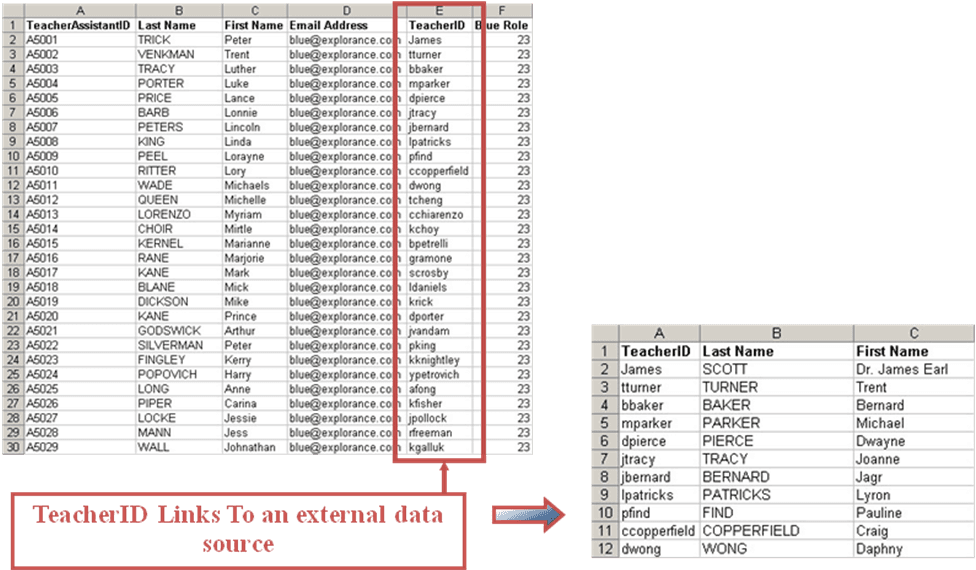
Once a group has been configured using the Links To link type, the project is automatically populated based on the linking field.
Once a group has been configured using the Links To link type, the project is automatically populated based on the linking field.
Note - When creating a Links to relationship, the field in the datasource that contains the IDs to be linked must be marked as Linkable when you import the datasource. In the example above, the TeacherID field, must be Linkable.
Hierarchy
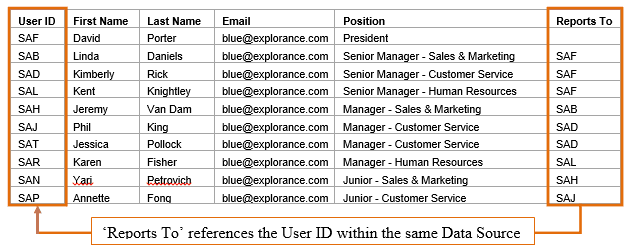
The hierarchy link type provides a simple means to identify a basic organizational hierarchy that identifies managers, peers, and subordinates. To implement this functionality, the user datasource must have a field that contains the User ID of the person that serves as the direct manager of the selected user. This differs from the Links to link type because the User ID of everyone in the hierarchy must be in the same datasource. Not supported in DIG definitions.
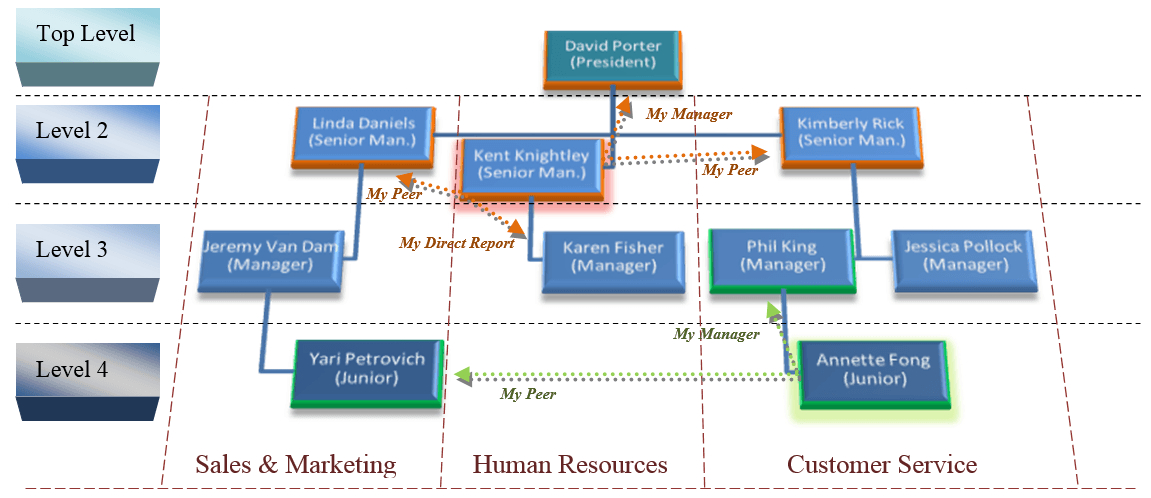
Once this field is identified, Blue establishes the desired relationship to the user (direct reports, managers or peers).
Global
The Global link type provides a method for allowing members the ability to complete any task that they have the privilege to complete.