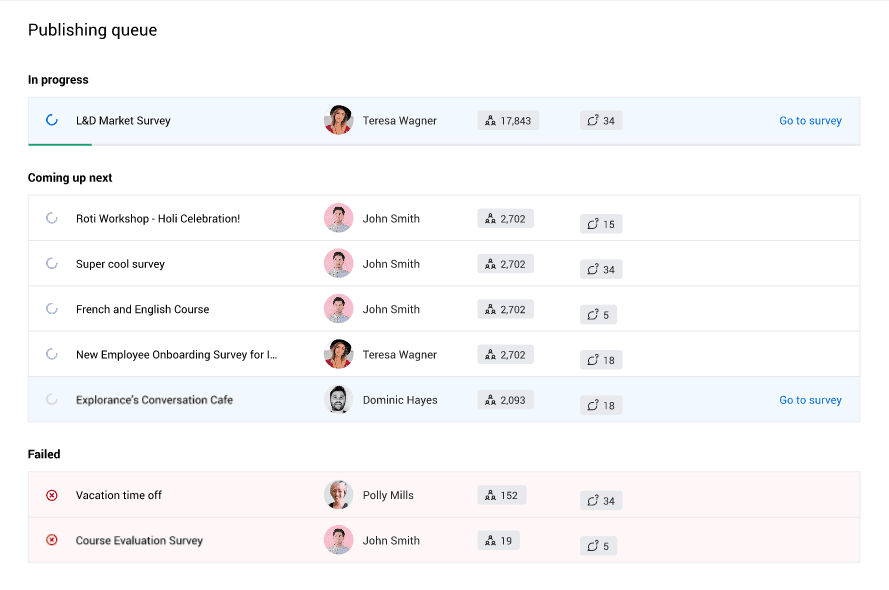
Review the publishing queue
Every survey published is added to a queue to be processed sequentially, similar to how a network printer queues printing jobs. To consult the queue, you can select Publishing queue from the BlueX homepage.
Depending on user privileges, users may only see their own surveys. As an administrator, you can view and manage the queue for all users.
THINGS TO KNOW ABOUT SURVEYS IN THE PUBLISHING QUEUE
- The list of surveys being sent contains those manually published by end-users, and those sent out automatically through the update of a contact list.
- You cannot stop a survey from being published once it is located in the publishing queue.
- You cannot change the order in which surveys will be published.
Publishing statuses
- In progress - Only one survey will be published at a time. You can consult the survey by selecting Go to survey.
- Coming up next - All surveys set to be published will be listed. The topmost one is the next in line to be published. You can consult the survey by selecting Go to survey.
- Failed - All surveys that encountered a publishing error will be listed here. These surveys can either be dismissed (removed from the queue) by selecting Dismiss, or queued again by selecting Retry. Sending back a failed survey to the queue will put it at the very end of the queue.
Survey information
Every survey listed in the publishing queue page displays the following information:
- Survey name
- Survey publisher
- Number of respondents
- Number of questions
The larger the number of respondents and questions, the longer it will take to publish the survey.
A green line under the In progress survey indicates how far along it is in the publishing process.