Using the Alert Sensitivity Control in MLY
Overview
The Alert Sensitivity Control lets you adjust how sensitive MLY is when detecting alerts in comments. This gives institutions the flexibility to match alert detection to their risk tolerance — whether they prefer high-certainty alerts or broader detection of early signals.
How It Works
- Each alert topic receives a score (0–100%).
- When the score exceeds your selected threshold, the comment is flagged for that alert category.
- All comments are automatically re-evaluated once you adjust the threshold.
Available Threshold Options
- High Confidence (≥85%) - Prioritizes precision and reduces false positives.
- Broader Coverage (65–85%) - Captures a wider range of potential risks and early indicators.
Using the Alert Sensitivity Control
- Navigate to the Analysis List and open your analysis in the Overview screen.
- The Sensitivity Control appears in the Alerts section on the right side of your screen.
- Choose the minimum alert score that aligns with the type of results you want. MLY will automatically recategorize comments based on the new threshold (see Available Threshold Options below for guidance).
- Click Set to save your selection.
- Go to the Comment Explorer section of the analysis, select the All alerts view to review the alerts displayed.
NOTE: You can adjust the Sensitivity Control as often as needed. MLY only recategorizes comments when you change this setting, so these adjustments do not affect quota consumption.
Analysis Overview – Alerts section
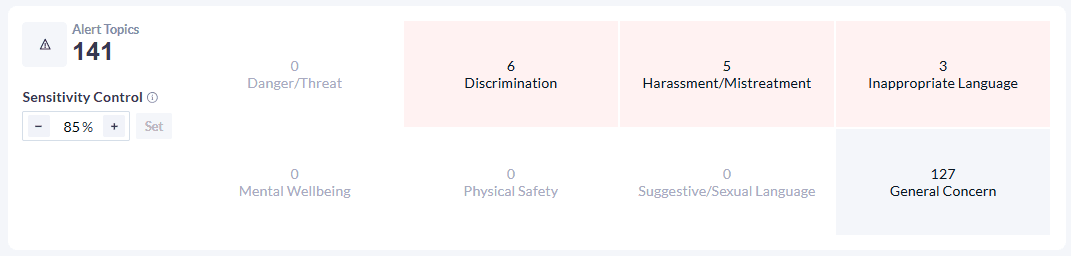
NOTE: After an MLY alert feature update, any deprecated alert categories are automatically converted to General Concern.