Multilingual Email Invitations
Email Invitations can be translated for all supported languages so email recipients can receive the communication in a language they understand.
When creating an email invitation there are two language settings to configure: Default Language, and Languages. The default language is the language that the email invitation will be sent if:
- No other languages are added to the email invitation
- The email invitation supports neither the recipient’s preferred language nor the class/ program’s default language.
Adding Languages to Email Invitation
To add additional languages to an email invitation follow the following steps:
- Navigate to Data Collection> Email Invitations
- Create New Email Invitation OR select existing Email Invitation
- In the general settings section, select the default language
- In the general settings section, select the needed language(s).
- Note: Only languages that have been added to your account will appear. Contact support or your MTM account team if you need additional languages.
- Under email message section provide the Sender Name, Subject, and Body for your default language.
- Repeat for all other needed languages using the Pick a language drop-down.
- When all languages have been entered, select Create or Update.
How does MTM know which language to use?
When determining which language to send the email in, MTM will look at three settings. First, MTM will look at the respondent’s preferred language. if there is a translation for the preferred language, then the email will be sent in this language. If Otherwise, MTM will next look at the class/ program’s default language. If there is a translation for the class/ program’s default language, then the email will be sent in this language. Lastly, if the email invitation does not have translations for either the respondent's preferred language or class default language, MTM will send the email using the email invitation’s default language.
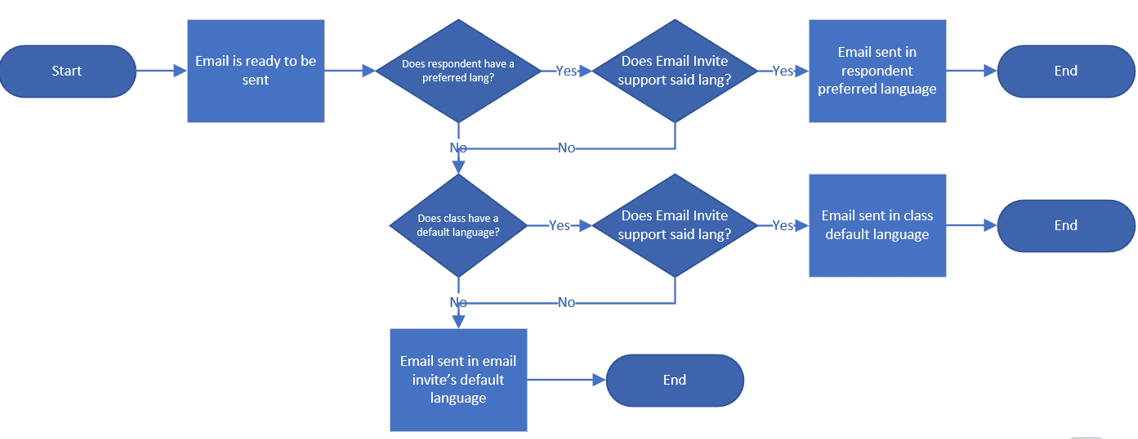
Frequently Asked Questions:
Q: What happens if I add a language to my invitation and update before inputting translations?
A: If no translation is entered, MTM will send a blank email.
Q: Will there be translations available for the standard email text?
A: Yes, translations will be available for all 31 supported languages.
Q: How does MTM know what language to send the email in?
A: MTM looks to see if the email invitation supports the learner's Preferred language. If the email invitation is not translated into the learner's preferred language, MTM will look to the Class default language. If the email is not translated into the default class language, MTM will send the email in the email invitation default language. More details can be found here. Link to article.