Quick analysis
Use Quick analysis to preview the insights of an individual comment using any analysis type. This feature can be used:
- to determine which insights analysis type analysis type may give you the most complete results for a sample comment from a large dataset.
- to become familiar with the components of an analysis when you are getting started with MLY or wish to show it to someone else.
Analyze a comment
- Copy / paste a comment into the field Insert your comment here
- If you don’t have a test comment, click on the Generate A Comment button, which will provide a sample comment for you.
- Select an Analysis type from the drop-down box
- Click Run Analysis to review the results.
- To test another comment, click Clear All and repeat the steps above.
NOTE
Comment size: The maximum number of characters that can be inserted into this tool is 1000.
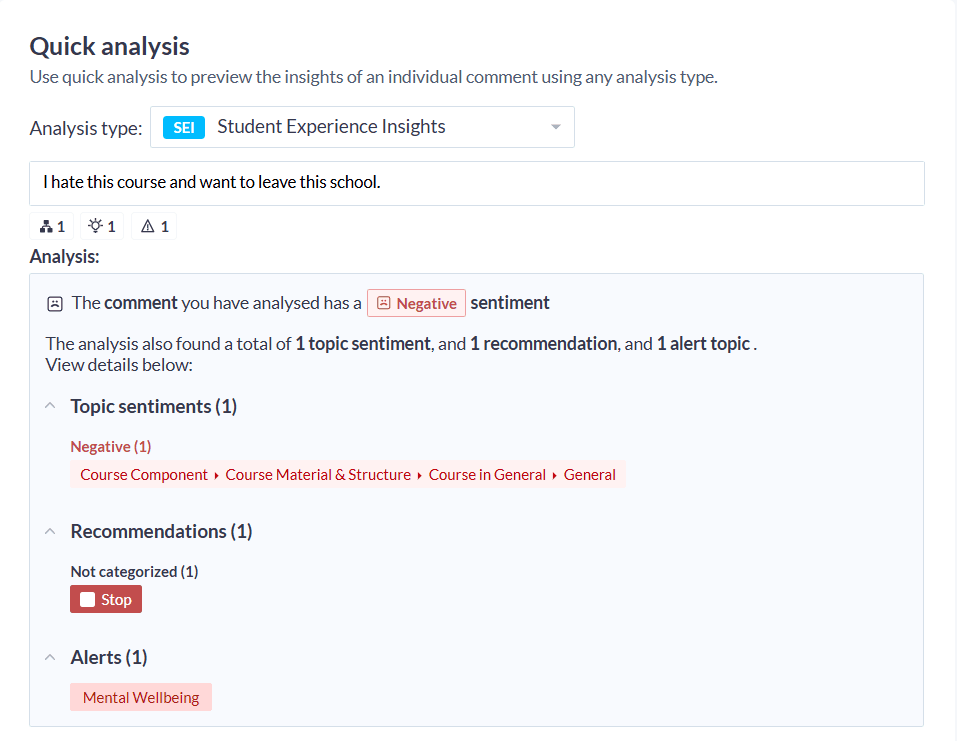
Review the results
The results of the analysis will depend on the model you have chosen. The example above was analyzed with Employee experience intelligence (EEI).
Sentiments, Recommendations and Alerts are included automatically in the SEI, EEI and ELI analysis types.
- Sentiments which provides the sentiment of the comment using the following attributes: positive, negative, neutral, not explicit, mixed.
- Recommendations which reveal insights and potential actions related to the comment: do more, do less, start, stop, continue, change.
- Alerts assigns an alerts score (based on the overall alerts threshold setting) and identifies and flags the comment for further consideration if it contains harmful text.
- EEI - Employee Experience Intelligence provides insights related to the employee experience.
- ELI - Employee Learning Intelligence provides insights related to the employee learning experience and the training effectiveness of the instructor and the course content.
- SEI - Student Experience Intelligence provides insights related to both the student experience and the training effectiveness of the instructor and the course content.
Under the comment text, a summary provides details of the analysis:
Overall negative
- 1 topic insights discovered
- 1 recommendations on possible actions to take
- 1 alert topics for this comment
Next, the Analysis displays a breakdown of the comment, indicating:
- the sentiment of each topic insight.
- the action recommendation(s) for the topic insight(s).
- the overall alerts topics for the comment.