Blue 9 Welcome Guide - Full Overview
Introduction
We are pleased to welcome you to Explorance Blue 9 — a modernized, secure, and scalable feedback analytics platform designed to unify feedback collection, advanced reporting, and intelligent insights.
Since its initial 9.0 release, Blue 9 has expanded its next generation platform, delivering major enhancements in accessibility (WCAG 2.2 AA alignment), dashboard analytics, qualitative intelligence through MLY integration, DIG data preparation workflows, and centralized Blue authentication and user management powering BlueX and MLY.
More than an upgrade, Blue 9 represents a foundational shift toward a unified ecosystem where feedback data, analytics, automation, and security work together seamlessly — empowering institutions and organizations to make informed, data-driven decisions with confidence.
Our Vision
This release isn't just a step forward; it's a leap toward a NEXT-GENERATION FEEDBACK ANALYTICS PLATFORM. Blue 9 is built on a cutting-edge technological infrastructure, which makes possible great advances we previously could only dare to dream of. Imagine a future where results are accessible through a customer-friendly data warehouse via Restful APIs. Imagine in-the-moment social feedback seamlessly coexisting with your course evaluations, surveys, and 360 reviews. Envision a mobile application that delivers reminders and deeper engagement directly to your users' mobile devices. With an emphasis on technology, user experience, security, insights, and engagement, these opportunities and so much more are what drive us at Explorance, and this reality begins with Blue 9.
Solutions
Blue is not just a typical survey software. It’s a holistic platform built to handle the most popular feedback initiatives, from student feedback on instruction to employee engagement in the workplace. Through best-in-class integration, powerful automation, and a robust reporting engine, Blue ensures your organization not only captures feedback but also turns it into the best possible decision.
Blue 9’s brand-new infrastructure increases your ability to see the big picture with all feedback data in one place using Blue’s feedback gathering solutions. All of these evaluations offer flexibility, personalization, and control when gathering feedback. Through best-in-class integration with student or employee information and learning management systems (SIS and LMS), Blue leverages your data to automate the evaluation processes fully. Advanced functionalities are specifically designed to handle the most complex evaluations and help improve your response rates.
With Blue’s robust reporting engine and dynamic dashboards, you can provide the right results, at the right time, to the right stakeholders. You can also determine which organizational experiences or processes need additional data for the development of action plans to support optimal learning outcomes, engagement, and culture.
This platform supports the latest security and cloud solutions to protect your users’ access and data confidentiality. In addition, it provides rapid scalability (using a single tenant application) and innovation (using Restful APIs to connect diverse applications) to adjust to your needs. This means that we will be able to roll out new releases and integrate our existing products and other external systems in a unified user environment which centralizes all of your feedback and reporting.
Blue People Insights Solutions
Blue Solutions support structured and ongoing feedback initiatives across higher education and enterprise organizations. Each solution is designed to scale, integrate, and generate actionable insights.
Higher Education Solutions
Course Evaluations
Use this solution to enable students to provide feedback on their courses and instructors about the teaching and learning experience.
Recommended audiences: Students, instructors, faculty.
Program Evaluations
Use this solution to collect feedback to assess the quality and effectiveness of academic programs.
Recommended audiences: Students, instructors, faculty, stakeholders.
Midterm Evaluations
Use this solution to enable instructors to collect student feedback during the semester to allow for improvements to the course and their teaching effectiveness.
Recommended audiences: Students, instructors, faculty.
Course Component Evaluations
Use this solution to collect feedback on the performance of course components to provide deeper insights about each course.
Recommended audiences: Students, instructors, faculty.
Peer Review and Holistic Feedback
Use this solution to combine results of instructor peer & self, midterm, and end-of-term evaluations to leverage data collected to generate dashboards and reports with multiple dimensions.
Recommended audiences: Students, instructors, faculty.
Enterprise Solutions
360-Degree Feedback
Use this solution to evaluate employee skills and performance by multiple raters to provide results used to create a learning development plan.
Recommended audiences: Employees, managers, executive leaders.
On-Demand 360 Multi-Rater Assessments
Use this solution to enable employees to set up their own assessments on a recurring basis and to select their raters, monitor response rates and download results.
Recommended audiences: Employees, managers, executive leaders.
Experience Surveys
Use this solution to assess how employees perceive their work environment, culture, and engagement.
Recommended audiences: Employees, managers, executive leaders.
Engagement Surveys
Use this solution to measure employee engagement and enable managers to add their own departmental questions and set the timing of their surveys.
Recommended audiences: Employees, managers, executive leaders.
Touchpoint Evaluations
Capture feedback at critical stages of the employee journey to measure impact and improve key moments.
Recommended audiences: Employees, managers, executive leaders.
What’s New in Blue 9
Home & End-User Experience (for end-users)
Blue Home (Modern Homepage)
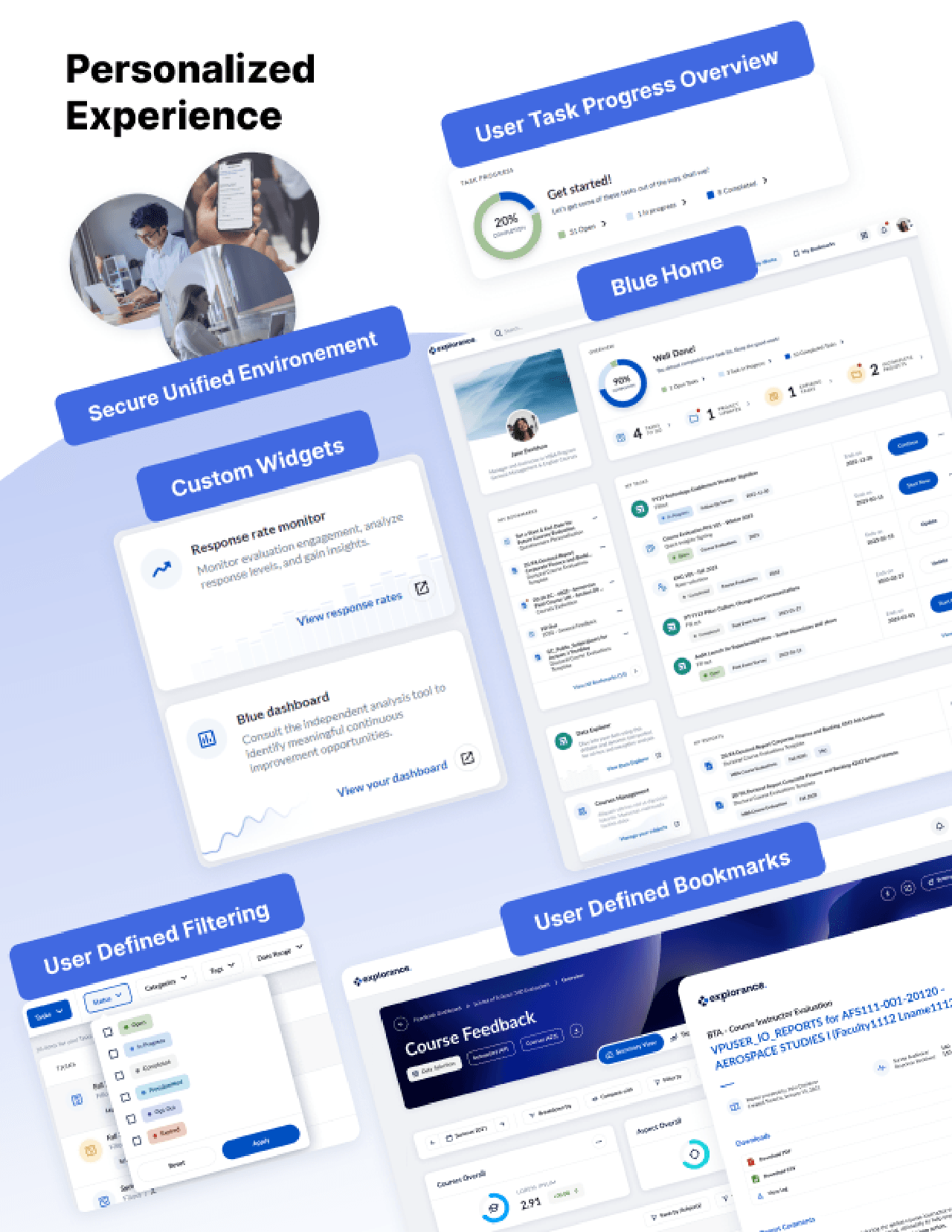
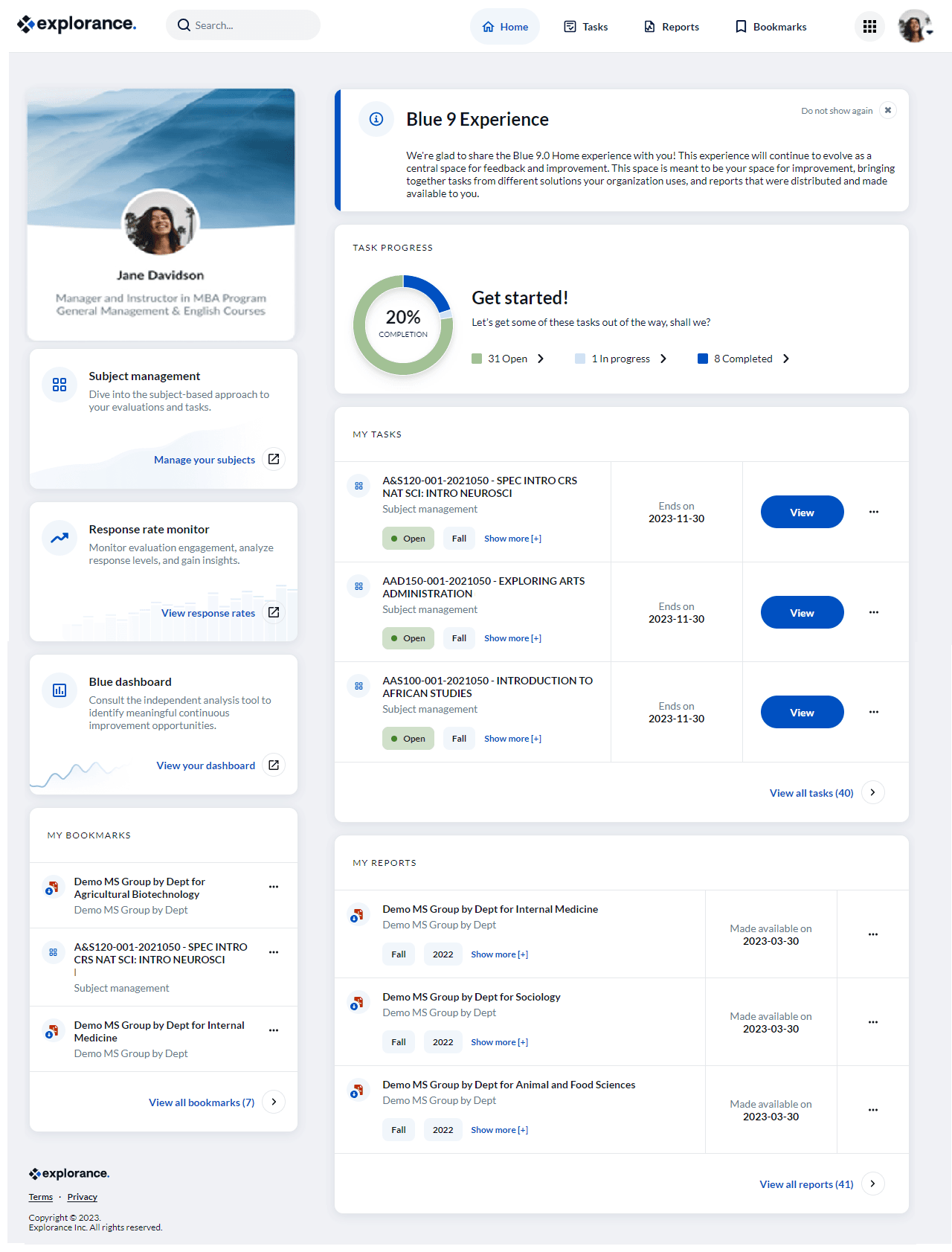
Treat your users to a brand-new homepage experience where they will be able to manage their survey load and increase their productivity. Meet Blue Home! You can organize an efficient workspace for your users by determining the placement, size, background image, and messaging for widgets. Having all their surveys and reports in one location will provide users with the opportunity to track their progress and discover trends or patterns in their historical reports.
Key capabilities:
- Configurable widgets (placement, size, messaging, background)
- Task progress overview widget with completion tracking
- Advisory message widget for change management communications
- Task and report widgets with personalized filtering
- Bookmarks for quick access to reports and tasks
- Subject Management, Response Rate Monitor, and Dashboard widgets
- Historical report access in one location
Learn more:
Blue Home widgets and layout
Customize Blue Home
Customize my Blue Home account
Accessibility (WCAG 2.2 AA)
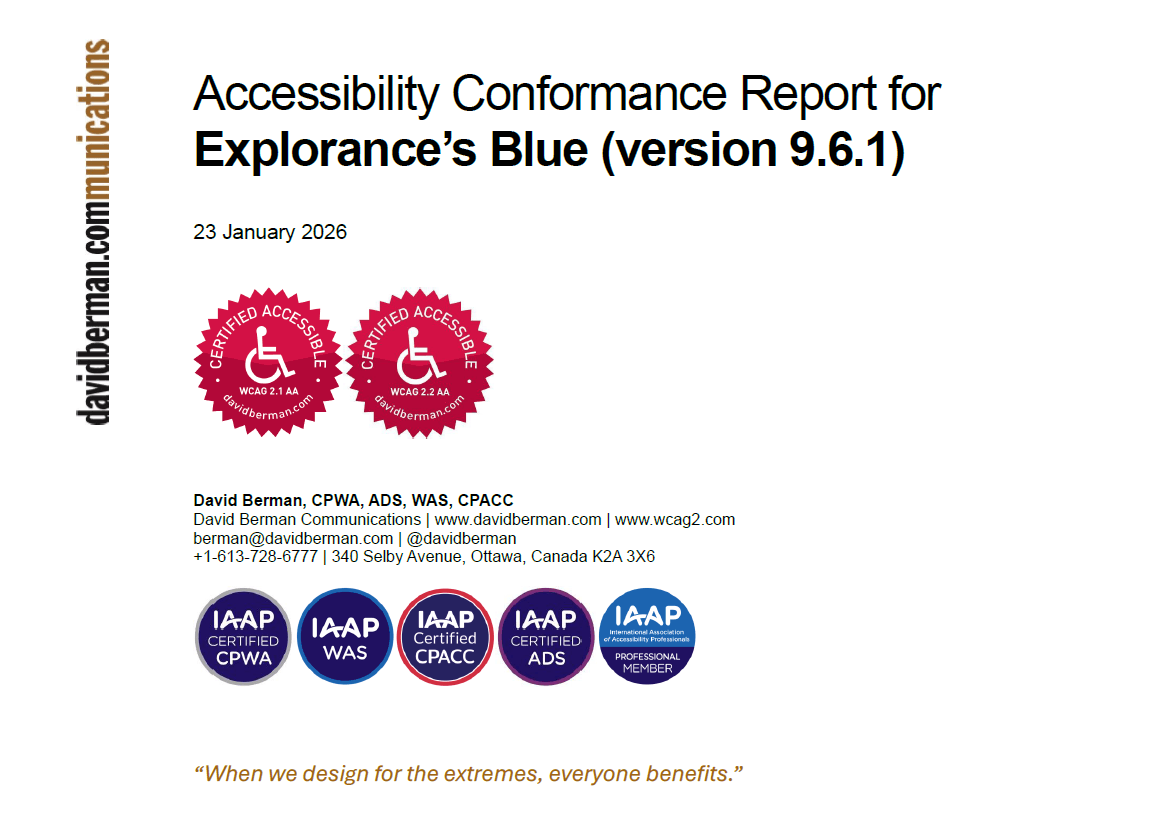
Blue 9.6.1 delivers WCAG 2.2 AA–aligned accessibility across core end-user experiences (Blue Home, Tasks, DIG, web and HTML reports, email workflows, LMS integrations, authentication pages). This enables customers to confidently meet 2026 accessibility requirements. In addition, a new PDF rendering service generates fully accessible, tagged PDF reports and significantly improves performance for high-volume batches.
Learn more:
WCAG 2.2 AA accessibility in Blue PDF reports: FAQs
Best practices for improving accessibility in Blue
Administration & Project Management (for admins)
Project Overview (Consolidated Validation Screen)
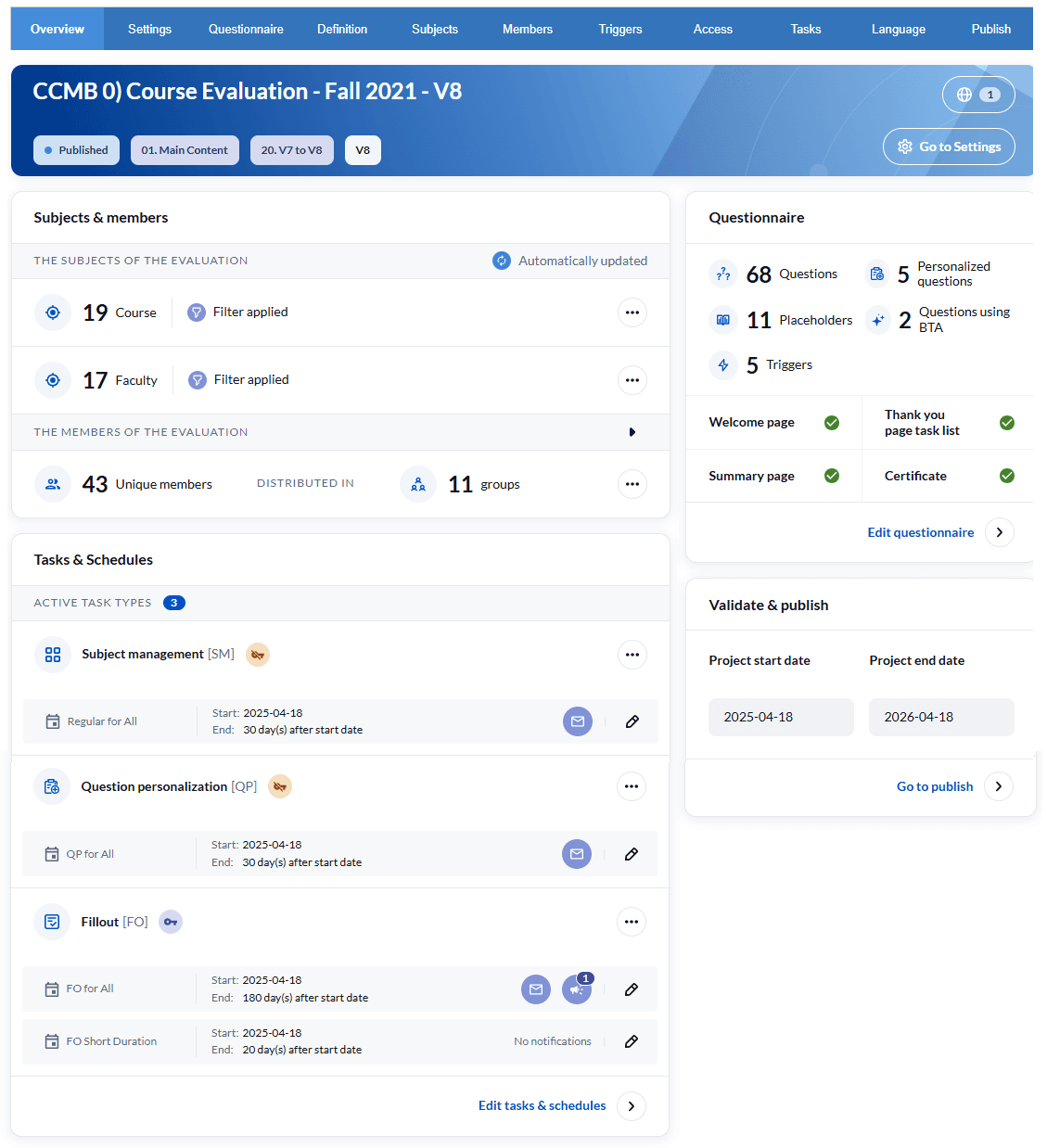
A new Project Overview page provides a single, centralized view to validate project settings before publishing including subjects, members, tasks, questionnaires and publish settings. Navigation across multiple tabs is substantially reduced, and publishing accuracy is improved.
Learn more: Blue administration - Project overview
New administration screens
With an increased focus on security as well as a whole new set of end user features, Explorance has added two brand-new administrative screens to help administrators focus on their enhanced capabilities to manage these areas:
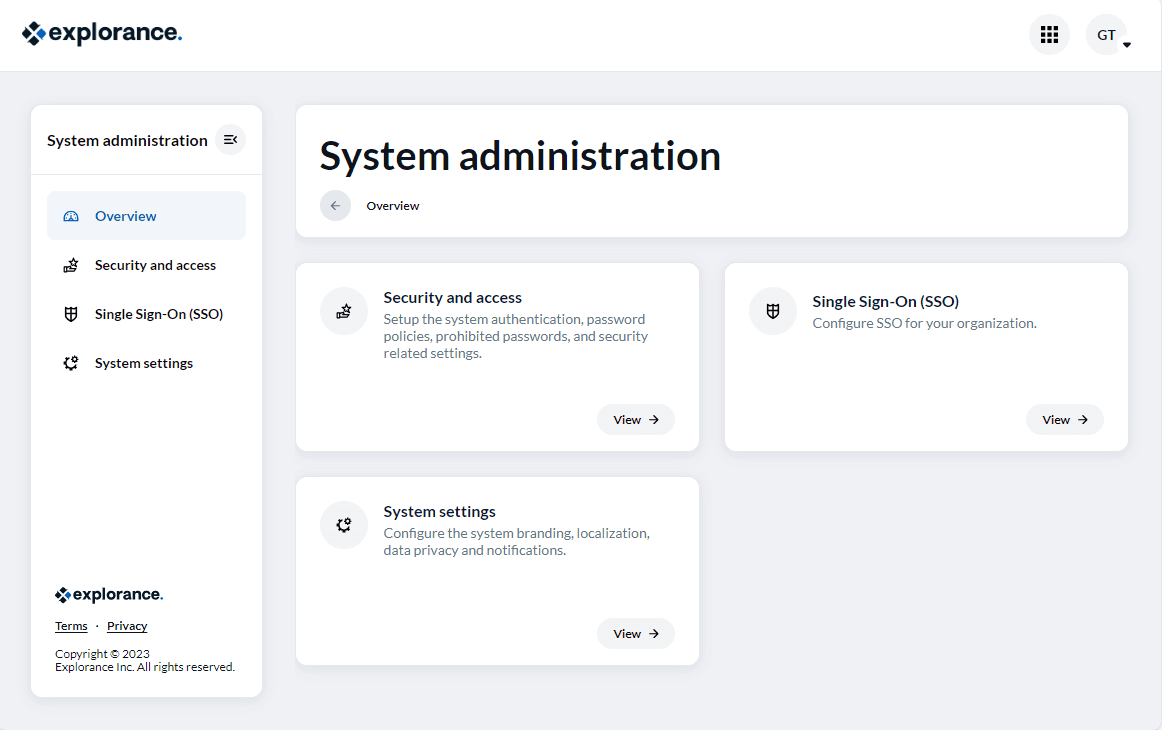
System administration
The system administration - system settings page allows you to customize brand and localization settings to personalize your experience.
Key capabilities include:
• Configuration of system authentication, password policies, and security setup
• Selection and setup of settings, configuration, and mapping for one or multiple Single Sign On providers that will be used with Blue 9
• Set up for branding, localization, and data privacy
Learn more: Configure SSO settings
Home administration
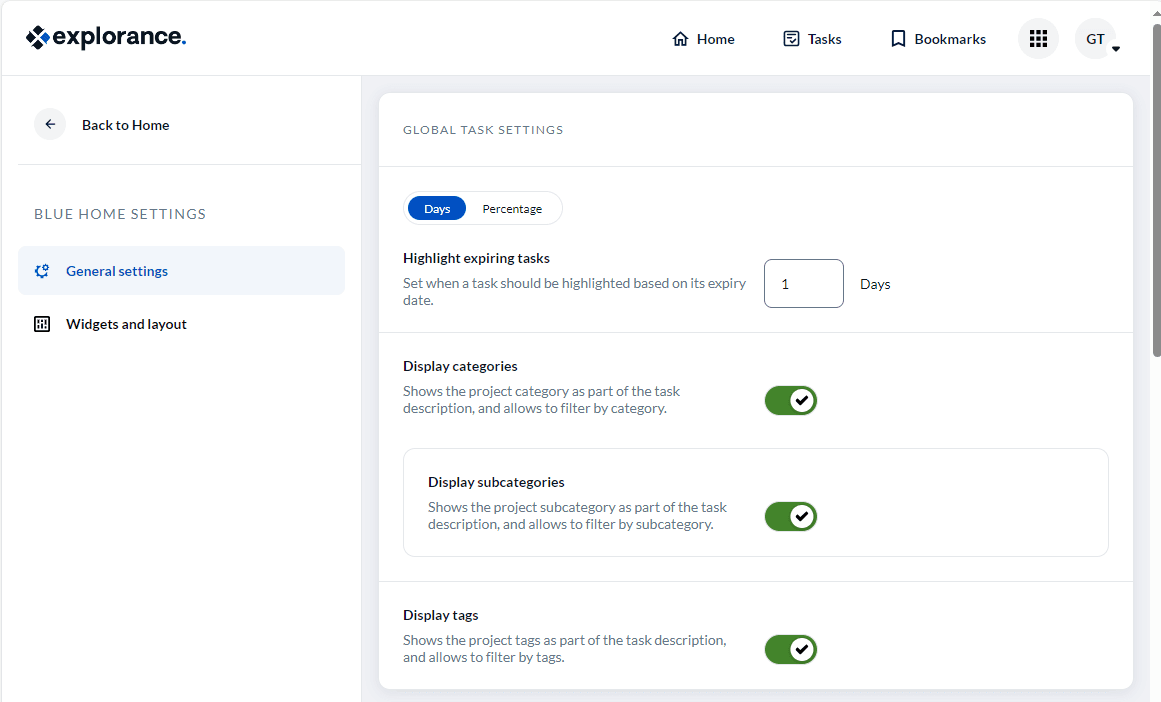
Home administration allows the Administer to customize what your users will see on the homepage.
Key capabilities include:
- Configure task and report list settings.
- Determine general settings such as whether or not to allow the display of an alternate email field in the user profile.
- Select and place the widgets in Blue Home workspace and configure the individual widget settings related to messaging, number of items displayed, etc.
Learn more:
Reporting & Dashboards (for analysts)
MLY in Blue Reports Integration
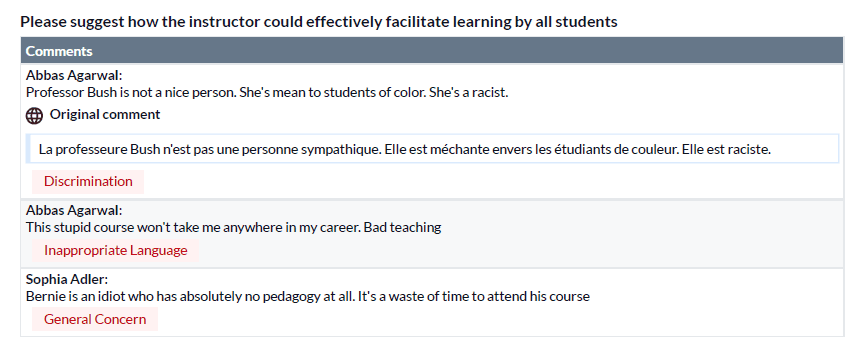
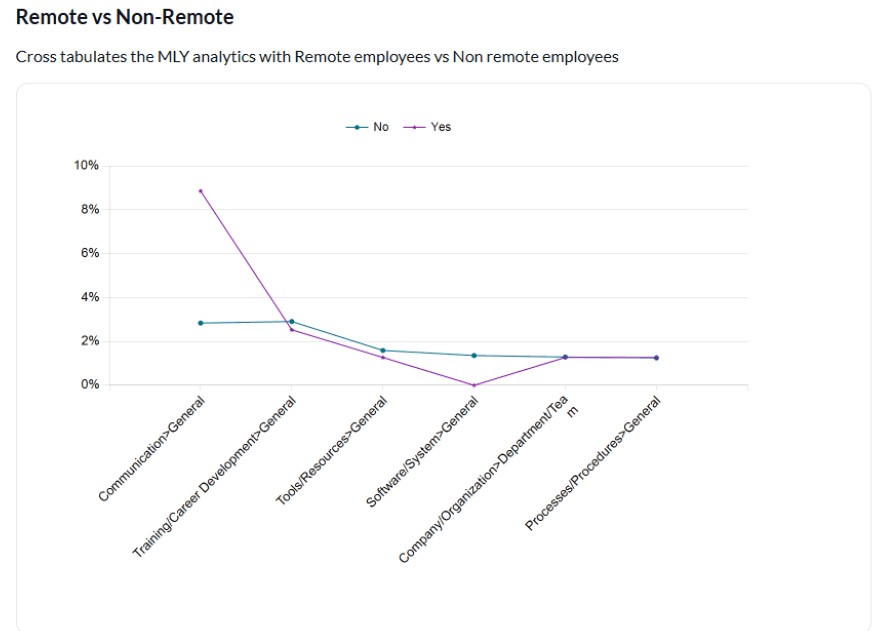
MLY has been integrated into Blue Reports to support qualitative analytics. This functionality enables users to analyze open-ended feedback alongside quantitative data, providing a more comprehensive view of stakeholder input.
Key capabilities include:
- Qualitative Insights: Automatically extract patterns, sentiments, recommendations, alerts, and discussion topics from open-text responses.
- Cross-Tabulation Support: Combine qualitative and quantitative data across demographic segments for more detailed analysis.
- Comment Redaction: Detect and redact harmful or inappropriate comments to support psychological safety in feedback environments.
- Multilingual Analysis: Translate comments automatically to include feedback from diverse language groups and improve representation.
- Alert Category Compatibility: Leverage the existing MLY alert framework within Blue to organize and filter comments by predefined, meaningful alert categories.
- Contextual Comment Analysis: Analyze each comment in the context of its associated question to improve insight relevance and interpretation.
- Manual Redaction Visibility: Display manually redacted comments directly within Blue Reports for improved transparency and review.
This integration is designed to enhance reporting workflows and support more informed decision-making based on both structured and unstructured data.
Learn more:
MLY in Blue Reports guide
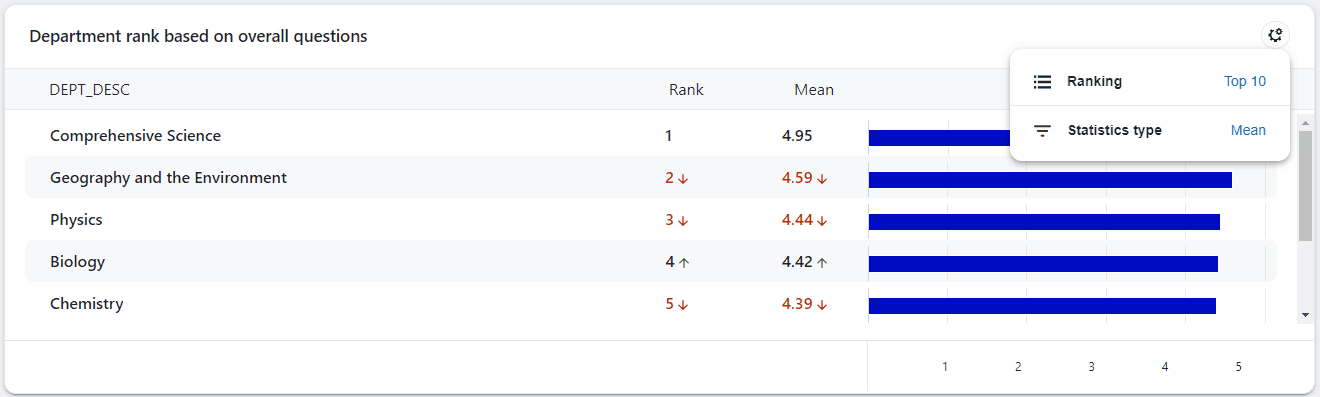
Blue Dashboard Enhancements
Blue Dashboard has been designed to provide better data visibility and control, new visualization and exports, enhanced metrics and ranking and admin tools for scalable customization.
Key visualization and segmentation capabilities include:
- Flexible Respondent Threshold: View more insights on aggregate dashboards even with fewer responses — ideal for exploratory analysis.
- Strict Threshold: Maintain privacy by hiding low-response data on individual dashboards and subject detail views.
- Trend Chart Sidebar: View tooltip data in a scrollable, printable table — great for large datasets and tablet use.
- Scatter Plot Export: Download chart data as CSV, including area and tooltip details — perfect for offline analysis.
- Ranking by Demographics: Rank items based on respondent attributes for deeper segmentation.
- Global Presets: Create reusable filters and comparisons for different groups.
Designed to improve segmentation, privacy control, and offline analysis.
Learn more:
View the individual dashboard
View the aggregate dashboard
Data Integrity Gateway (DIG) (for data teams)
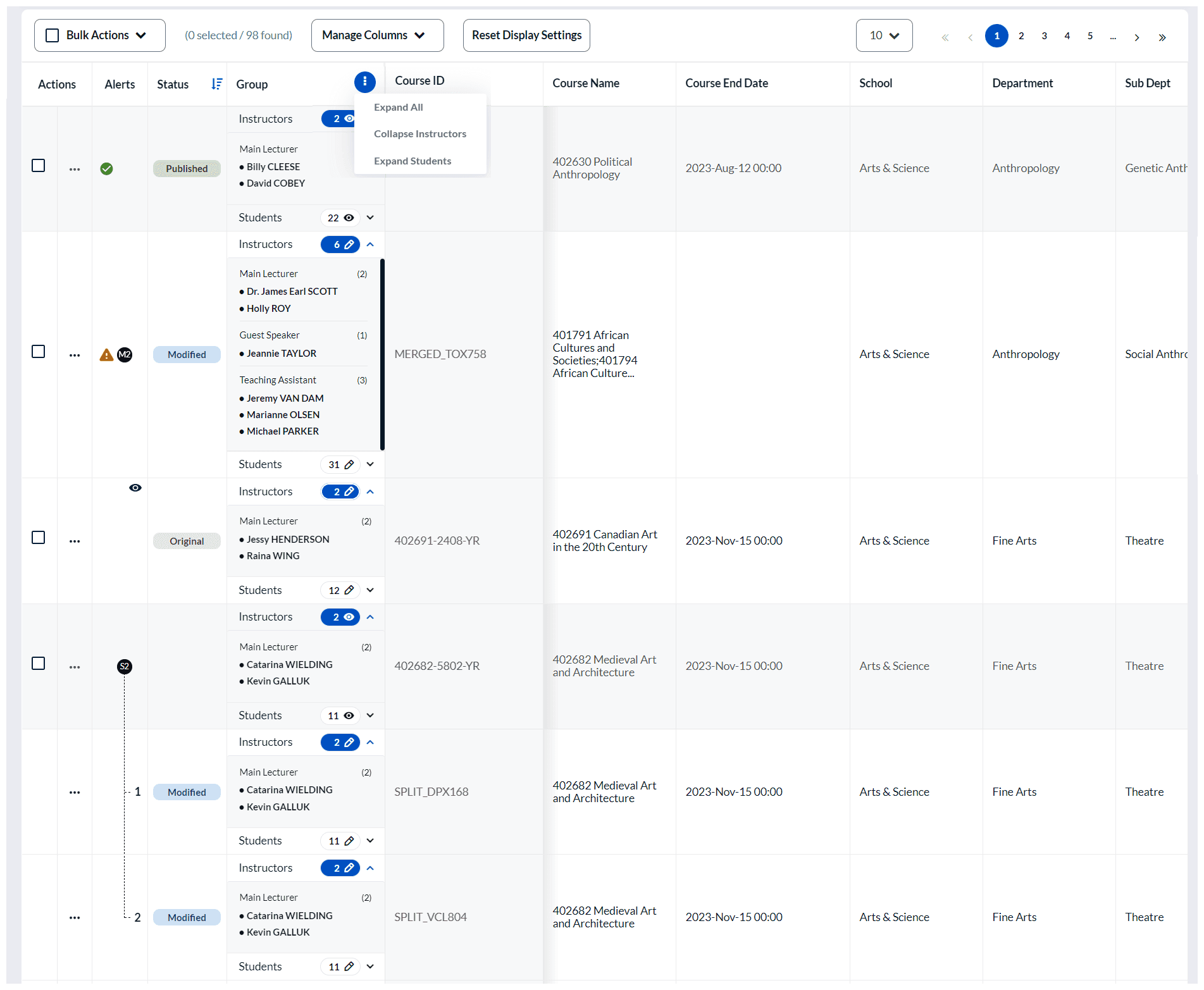
Enhanced DIG User Interface DIG users can more efficiently organize and edit their data for more complete and accurate evaluations. With a new user interface for managing DIG data, users will experience a whole new way of preparing their data in an updated easy-to-use interface. Improvements include: • Streamlined data review workflows • Inline editing capabilities • List boxes and date pickers • Improved navigation and organizational tools Designed to improve data accuracy, efficiency, and preparation speed before evaluations launch.
Learn more about DIG:
DIG power guide
Data preparer task guide.
Security & Authentication (for IT security)
Blue Authentication (OAuth 2.0 Certified)
- Enhanced built-in authentication security
- Unified sign-in and sign-out experience
- Improved session management
- Stronger password policy enforcement
Provides a secure alternative for users without SSO access.
Learn more:
Transition guide from Blue 8 to 9 - IT administrators
Configure SSO settings
Expanded SSO Options
Additional supported providers (see image below):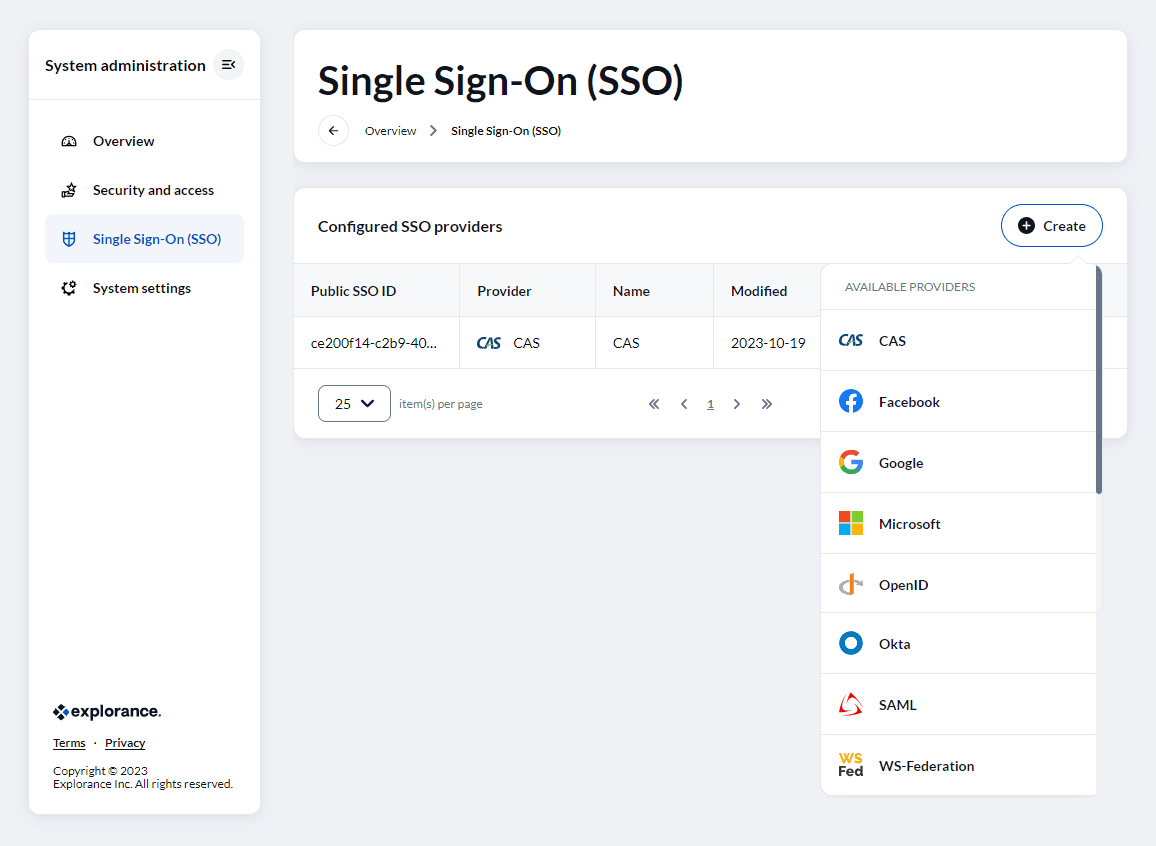
SSO configuration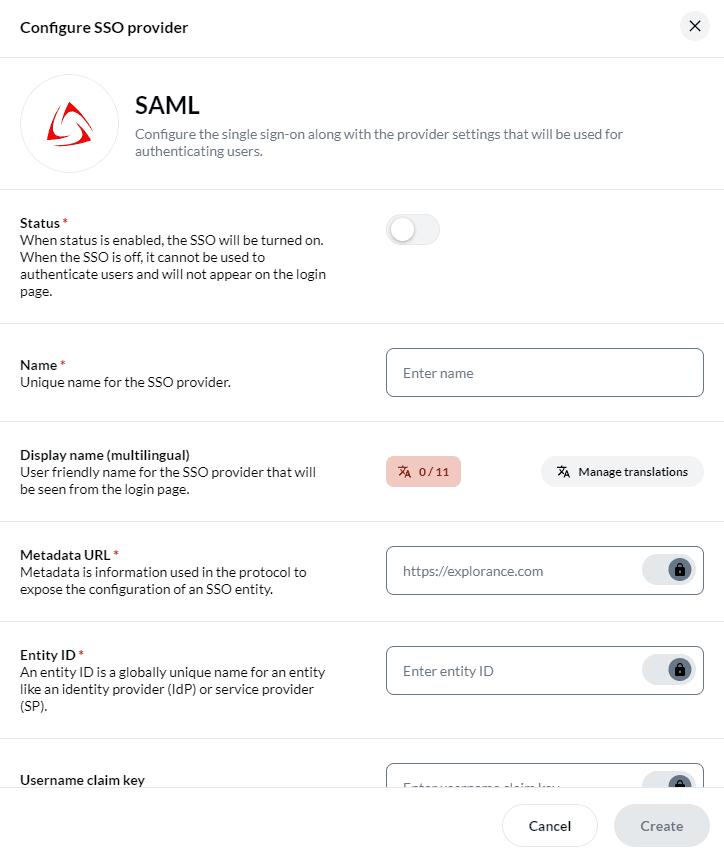
Integrations & Ecosystem (for IT administrators)
BlueX and MLY Integration with Blue User Management
Blue integrates with both BlueX and MLY to streamline user and access management. This includes centralized identity control, flexible provisioning, and automated data synchronization.
- Centralized Access Control: Identities and permissions across Blue, BlueX and MLY managed from a single point.
- User Provisioning: Admin users Added and managed via UI, data connectors, or CSV upload.
- Group-Based Access: Customized access and visibility for organizations using multiple Explorance products.
- Scheduled Updates & SSO Mapping: User records stay current across systems.
- Unified Login: Consistent login experience enabled across all three platforms.
Plan your upgrade to Blue 9?
Step 1: Existing Blue clients should consult the following documents that contain important information to prepare for the new platform.
Blue 9 Transition guide from Blue 8-9 for administrators
Blue 9 Transition guide from Blue 8-9 - for IT administrators
Step 2: Contact Explorance support to plan your upgrade and reserve a date.
Upgrade FAQs
If I have more than one user datasource, do I need to consolidate my datasources before the upgrade?
No, Consolidation is not required prior to upgrading. If you are considering datasource consolidation as part of your modernization strategy, contact your Explorance account manager to discuss options.
Are there any changes to our current DST integrations in Blue 9?
Yes, DST will require a new Blue 9 URL and all data blocks must be removed and recreated in the DST to ensure proper integration.
Will my messages and settings be carried over when I copy from an older project created in Blue 8 to a new one in Blue 9?
Yes. Existing reports remain consistent.
Will archived projects be carried over during the upgrade? Yes. Archived projects are retained during the transition.
Will my reports remain the same in Blue 9? Yes. Existing reports remain consistent. Additionally, Blue 9 introduces performance improvements and accessible PDF enhancements.
Should I upgrade in the middle of a semester when I have live projects? For a major upgrade, we generally recommend that you upgrade once all your projects have expired, and you are no longer collecting responses or generating reports. If that is not possible, contact the Explorance support team to discuss your situation.